 DOUBLE CLICK THE IMAGE TO ENLARGE
Use A3 cartridge paper.
Draft THREE different film posters for your film you are planning to make.
Annotate your three draft film posters using the FIVE areas:
1. PEOPLE
2. DESIGN
3. COLOUR
4. TITLE
5. Other Information

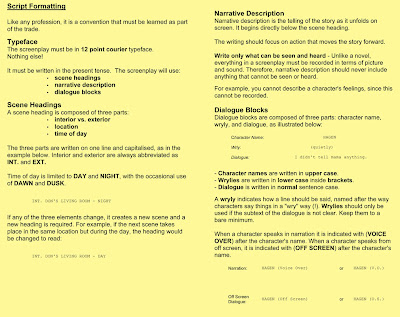 DOUBLE CLICK ON THE IMAGES TO ENLARGE
 DOUBLE CLICK ON THE IMAGE TO ENLARGE
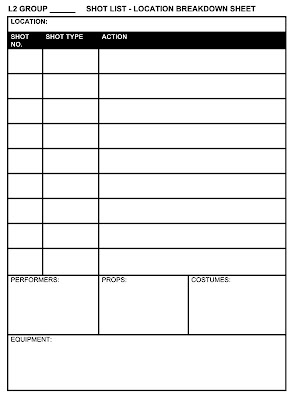 1. Create a SHOT LIST for each location.
2. Remember to add EXTRA cutaway shots if needed for extra coverage of the scene.
3. Create a PHOTOSHOP location IMAGE SHEET for each location.
- For locations at college, take the camera and take photographs.
- For locations outside college, use GOOGLE MAPS - use the virtual walk mode and take screen grabs [cmd - shift - 4].

4. Produce a Photoshop PROPS IMAGE SHEET for each scene.
- If you need to purchase a prop, research where would you find the cheapest price?
 STORYBOARDING THE END SEQUENCE
:
 CINEMATOGRAPHY: USING A VARIETY OF CAMERA SHOTS FOR THE ACTION SEQUENCE:
 1. Generate a TIMELINE for your end sequence using your 9 KEY FRAMES.
2. Create the STORYBOARD for the end sequence.
1. Produce a MOODBOARD from 20 IMAGES from the internet that illustrate visual ideas for your end sequence. Reference each image by recording it's URL ADDRESS on the IMAGE SHEET.
N.B. Your last 5 images have to be found on Flickr.
3. HIGHLIGHT on the image sheet the LEGAL CONDITIONS SYMBOLS that have been assigned to your chosen Flickr images.
3. Create the MOODBOARD in Photoshop:
New project > International Paper > A4 > 300 dpi (to print)CREATIVE COMMONS & FLICKRCreative Commons is a nonprofit corporation dedicated to making it easier for people to share and build upon the work of others, consistent with the rules of copyright.
They provide free licenses and other legal tools to mark creative work with the freedom the creator wants it to carry, so others can share, remix, use commercially, or any combination thereof. DOUBLE-CLICK ON THE IMAGE TO ENLARGE
SESSION 3 TASK:
Write a TREATMENT (Synopsis) for the end sequence of your action-thriller film.
A TREATMENT > SALES TOOL TO PROMOTE A FILM IDEA > SENT TO PRODUCERS
- Summarises the key events
- Conveys a clear sense of the proposed storyline
- A WHO, WHAT, WHEN & WHERE of the story
- Written in the present tense
- No dialogue
- Write the treatment in Word
- Try to write about three paragraphs (one side of text)
 Produce the closing two stages of an action-thriller film.
- You need to produce TWO sequences before the end credits.
- One of the sequences needs to have dialogue.
- Some part needs to be an action sequence.
- You need to consider what visual style the film will have.
GROUP 1: Tom, Jamie & Craig
GROUP 2: Ashleigh & Edward
GROUP 3: Jack, Ben & Lee
GROUP 4: Kristie, Lewis & Nicc
SESSION 1 & 2 TASK:
On the provided A3 sheet, map out the groups initial ideas for the end sequence.


