 PART 1
In PAGES create bar/pie charts for the results for each of your questions.
Use the example above as a template.
Question 1 should have information of the numbers of students in your profile group (8 not including yourself) and who the group are, L2 students etc.
PART 2
When you have finished all the questions write a summary of your results:
Do the results differ from what you expected?
Which poster was seen to be most effective?
Would this be your choice?
Has there been suggestions on how to improve your poster design?
Was there any part of design that was seen not to work?
This summary should be about two paragraphs.
 EXHIBITION CONTACT SHEET TASK
PART 1
1. Choose 12 photos from the ones you took at the Saatchi Gallery in London.
2. Place the images behind the contact sheet layer in Photoshop.
3. Create a unique backgroud design.
4. Add the Saatchi Gallery logo.
5. Add the show title: NEWSPEAK - BRITISH ART NOW (Part 2) - use the scanned exhibition catalogue cover.
6. Add artist/title/date/media information to the slides.
(Check the exhibition catalogue if you didn't make a note of the detail at the exhibition)7. Upload finished jpeg to Flickr.
PART 2Create a new post on your blog.
PARAGRAPH 1:
Information about the Saatchi Gallery in London.
i) What is the Saatchi Gallery. Where is it located?
ii) Who created the gallery and why?
iii) What kind of art does the gallery show?
[Use Wikipedia or the gallery website]
PARAGRAPH 2:
Write a short paragraph about the show you visited.
[NEWSPEAK - BRITISH ART PART 2]
PARAGRAPH 3:
Write about your images on your contact sheet:
TITLE / ARTIST / DATE / MEDIA
Why did you choose the artifact/artist?
Which photographs on the contact do you think are the most successful?
Explain why.
 CLICK ON THE ABOVE IMAGE TO ENLARGE
22 September 2010 – 30 January
The Design Museum presents a major exhibition of the work of John Pawson. Often described as a 'minimalist' he is known for a rigorous process of reduction, that creates designs of simplicity, grace and visual clarity. At the heart of the exhibition is a site-specific 1:1 full-sized installation designed by Pawson to offer a direct experience of his work - the first such installation at the museum.
Plain Space celebrates Pawson's career to date with models, film, photographs and architectural elements and includes some of his most important projects including the Cistercian Monastery of Our Lady of Nový Dvůr in the Czech Republic, the Sackler Crossing at the Royal Botanic Gardens, Kew and the Calvin Klein store on Madison Avenue, New York.
See behind the scenes images, films and comment on the Plain Space Blog.
 DOUBLE CLICK THE IMAGE TO ENLARGE
Use A3 cartridge paper.
Draft THREE different film posters for your film you are planning to make.
Annotate your three draft film posters using the FIVE areas:
1. PEOPLE
2. DESIGN
3. COLOUR
4. TITLE
5. Other Information

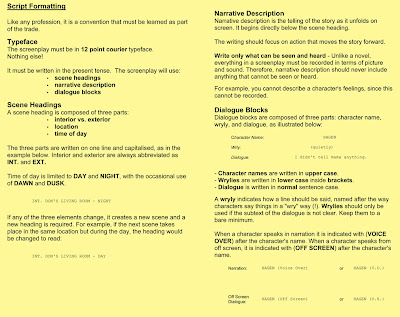 DOUBLE CLICK ON THE IMAGES TO ENLARGE
 DOUBLE CLICK ON THE IMAGE TO ENLARGE
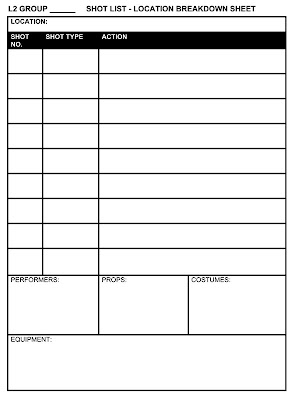 1. Create a SHOT LIST for each location.
2. Remember to add EXTRA cutaway shots if needed for extra coverage of the scene.
3. Create a PHOTOSHOP location IMAGE SHEET for each location.
- For locations at college, take the camera and take photographs.
- For locations outside college, use GOOGLE MAPS - use the virtual walk mode and take screen grabs [cmd - shift - 4].

4. Produce a Photoshop PROPS IMAGE SHEET for each scene.
- If you need to purchase a prop, research where would you find the cheapest price?
 STORYBOARDING THE END SEQUENCE
:
 CINEMATOGRAPHY: USING A VARIETY OF CAMERA SHOTS FOR THE ACTION SEQUENCE:
 1. Generate a TIMELINE for your end sequence using your 9 KEY FRAMES.
2. Create the STORYBOARD for the end sequence.
1. Produce a MOODBOARD from 20 IMAGES from the internet that illustrate visual ideas for your end sequence. Reference each image by recording it's URL ADDRESS on the IMAGE SHEET.
N.B. Your last 5 images have to be found on Flickr.
3. HIGHLIGHT on the image sheet the LEGAL CONDITIONS SYMBOLS that have been assigned to your chosen Flickr images.
3. Create the MOODBOARD in Photoshop:
New project > International Paper > A4 > 300 dpi (to print)CREATIVE COMMONS & FLICKRCreative Commons is a nonprofit corporation dedicated to making it easier for people to share and build upon the work of others, consistent with the rules of copyright.
They provide free licenses and other legal tools to mark creative work with the freedom the creator wants it to carry, so others can share, remix, use commercially, or any combination thereof. DOUBLE-CLICK ON THE IMAGE TO ENLARGE
SESSION 3 TASK:
Write a TREATMENT (Synopsis) for the end sequence of your action-thriller film.
A TREATMENT > SALES TOOL TO PROMOTE A FILM IDEA > SENT TO PRODUCERS
- Summarises the key events
- Conveys a clear sense of the proposed storyline
- A WHO, WHAT, WHEN & WHERE of the story
- Written in the present tense
- No dialogue
- Write the treatment in Word
- Try to write about three paragraphs (one side of text)
 Produce the closing two stages of an action-thriller film.
- You need to produce TWO sequences before the end credits.
- One of the sequences needs to have dialogue.
- Some part needs to be an action sequence.
- You need to consider what visual style the film will have.
GROUP 1: Tom, Jamie & Craig
GROUP 2: Ashleigh & Edward
GROUP 3: Jack, Ben & Lee
GROUP 4: Kristie, Lewis & Nicc
SESSION 1 & 2 TASK:
On the provided A3 sheet, map out the groups initial ideas for the end sequence.


